Rating Strategies
How to configure and apply risk rating strategies across projects and rating types
Contents
- 1. Introduction & Context
- 2. Key Features & Functions
- 3. Requirements
- 4. Step-by-Step Guide
- 5. Common Issues & Troubleshooting
- 6. Related Articles
1. Introduction & Context
A rating strategy controls which risk matrix is used to rate a given custom type and rating type, so you can tailor how risks are evaluated across your organisation. Rating strategies let you combine project-specific risks, custom risk types, and different rating methodologies (for example Inherent, Residual, and ALARP) into a flexible, scalable approach that aligns with both enterprise-wide and project-specific priorities.
Who is it for? System Administrators who manage risk matrices and need to control how different projects and risk types are rated.
What does it impact? A rating strategy determines the matrix applied to risks for the projects and rating types it covers. Changing the strategy for a project affects how existing risks display: ratings recorded under the previous strategy are struck out because they no longer apply, and those risks need to be re-rated on the new matrix.
2. Key Features & Functions
- Customisability: configure risk matrices for different projects, custom types, and rating combinations. For example, the Risk Inherent matrix can be configured differently from the Risk Residual matrix within the same project.
- Scalability: apply consistent risk evaluation across multiple projects.
- Reusability: reuse the same matrix dynamically across different rating strategies, minimising redundancy.
- Alignment with organisational goals: ensures risk ratings reflect enterprise-wide and project-specific priorities.
3. Requirements
- System Administrator access to Admin > Rating Strategies.
- At least one risk matrix must already be created, so it can be selected when adding a strategy.
- The relevant custom types (for example Risk or Opportunity) and rating types (for example Inherent, Residual, ALARP) must be configured.
4. Step-by-Step Guide
Add a new rating strategy
- Navigate to Admin > Rating Strategies.

Navigating to Admin then Rating Strategies.
- Identify the appropriate risk custom type on the Rating Strategies page. For example, to add a rating strategy for Risk, go to the Risk Rating Strategies section shown below.

The Risk Rating Strategies section on the Rating Strategies page.
- To create a new rating strategy, click the Add button in the appropriate rating strategies section and select a Rating Type, for example Inherent.

Selecting a rating type after clicking Add.
- Complete the Add Rating Strategy form (see the field reference below).
- Click the Save button at the top to apply the selected risk matrix to the specified projects and risk types.
Add Rating Strategy form fields
- Title: name the strategy.
- Matrix: choose the risk matrix to be used.
- Rating Style: defines how the rating appears. The default includes severity, likelihood, and the associated risk levels.
- Rateable Custom Type: set automatically based on the selected custom type.
- Rating Custom Type: displays the selected rating type (read-only).
- Default for Type: makes this the default rating strategy for all new projects. All risks in projects created afterwards will use this matrix for their Inherent rating.
- Projects: makes this the default rating strategy for the selected projects.
- Apply to All Projects: when checked, applies the rating strategy to risks across all projects.
- Severity Focus / PMC:
- Severity Focus: requires selecting a Likelihood Category before saving.
- PMC: uses a predefined Likelihood Category, removing the need for manual selection.
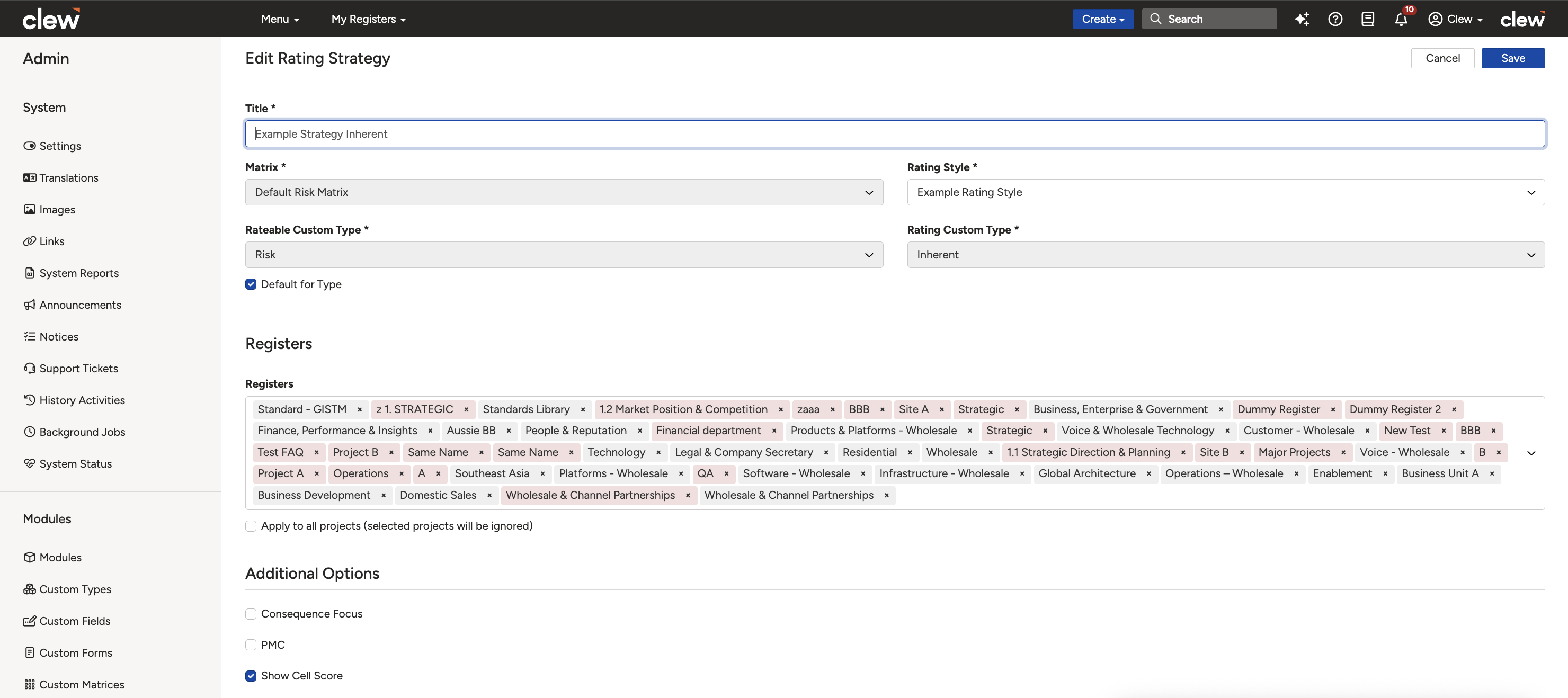
The completed Add Rating Strategy form.
5. Common Issues & Troubleshooting
| Issue | Likely Cause | Solution |
| Rating strategies appear already linked to a matrix you just created | When a matrix is created, related rating strategies are auto-populated based on the risk matrix, custom type, and rating type. | This is expected. Simply assign projects to these strategies to enable the matrix for rating risks linked to the project. |
| A project is not available for selection on the rating strategy page | The project may already be linked to another rating strategy. | Unlink the project from its current rating strategy before assigning a new one. |
| Risk ratings are struck out after changing the strategy | Risks rated under a previous strategy have their ratings struck out because they no longer apply. | This is expected. Re-rate the risks using the new matrix to align with the updated strategy. |
How to check a project's current rating strategy:
- Open any risk linked to the project.
- Click on the rating type (for example Inherent, Residual, or ALARP). The displayed matrix indicates the matrix in use.
- Go to Admin > Rating Strategies and open the custom type subpanel (for example Risk or Opportunity).
- Within this section, the matrix in use plus the rating type (for example Default Matrix, Inherent) determines the project's current rating strategy.
Best practices:
- Create the required risk matrix before adding a rating strategy that uses it.
- Select the correct custom type and rating type before completing the form.
- Before changing a project's strategy, remember that existing ratings will be struck out and will need re-rating.
- Unlink a project from its current strategy before trying to assign it to a new one.
Click a title to preview it here. Use the Open full article button to read the full version in a new tab.
▾Risk Matrix Configuration Open full article »
Related article
How to build the risk matrix that a rating strategy applies to a project and rating type.
▾Mapped Ratings Open full article »
Related article
How ratings produced under a strategy translate across a parent and child project hierarchy.
Was this article helpful?
That’s Great!
Thank you for your feedback
Sorry! We couldn't be helpful
Thank you for your feedback
Feedback sent
We appreciate your effort and will try to fix the article