Why did my new register have risk matrices assigned by default?
A Risk Matrix can be applied to a register by default. This setting can only be changed by a System Administrator.
If you are a system admin and you want to change the risk matrix which has been applied to your register, follow these steps:
- Navigate to Admin > Risk Matrices and make sure the matrix you want to add has already been created. Please note, that matrices can also be created under custom matrices and applied to custom fields. Only create a risk matrix, if you want this to replace a risk matrix here:

- Navigate to Admin > Rating Strategies. Here you can assign which matrix should be used for each risk custom type within a register.
- Scroll down to locate the relevant risk custom type and open it. The checkbox ‘Default for Type’ determines whether any new register will default to this rating strategy.
Note: The field ‘Matrix’ is displaying the risk matrix used for this strategy, in this case the name of the matrix is ‘Default Risk Matrix.’.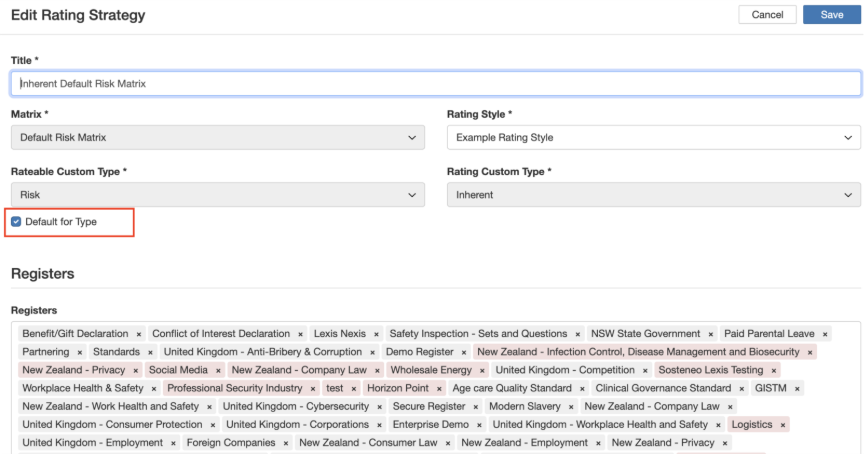
- To remove a Risk Matrix as the default, simply untick the checkbox and to apply a different Risk Matrix to a register, first remove the register from the field and save. This will allow you to apply the Register to a different Rating Strategy.
To find more detailed information, you can read the articles about Risk Matrices or Rating Strategies.
Was this article helpful?
That’s Great!
Thank you for your feedback
Sorry! We couldn't be helpful
Thank you for your feedback
Feedback sent
We appreciate your effort and will try to fix the article