Context
The "Quick Create" feature allows you to create records with a single click, without having to navigate to the respective list views.
Please note: You must be a System administrator to configure the create menu.
How To customise the ‘Create’ menu
- Navigate to Admin > Links
- Click the “Add” button and fill in the form fields:
- Title: Enter a title for the link. This is what the user will see in the Create menu button.
- Link URL: Copy and paste the URL.
- Link Type: Select “Create Menu” from the dropdown.
- Position : Set the position in which this link should appear.
- Project Scope: It scopes the page to the project with the /projects/:id in the URL. If “Project Scope” option is enabled, the link will attempt to keep the project id in the URL and will not remove it when user clicks the link.
- Open in New Tab: Select “Yes” to open the form in a new tab.
- Icon: Select an icon for the link.
- Color : Choose the icon colour.
- Teams: Only selected teams can see the link in the create menu. Leave blank to show it to all users.
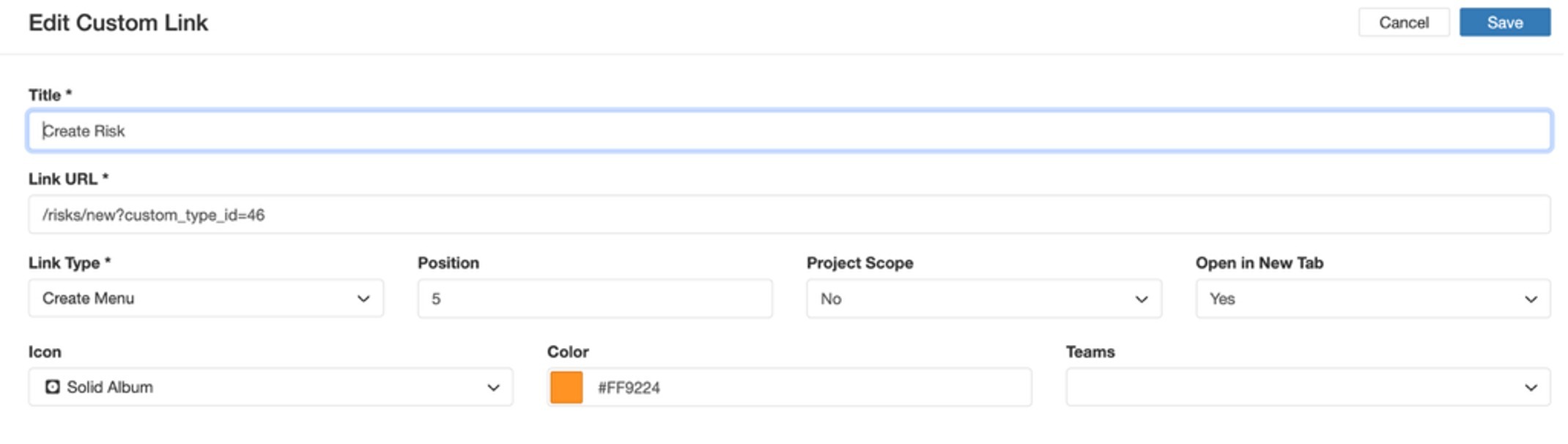
3. At last, click on Save button.
To learn more about Links click here.
Was this article helpful?
That’s Great!
Thank you for your feedback
Sorry! We couldn't be helpful
Thank you for your feedback
Feedback sent
We appreciate your effort and will try to fix the article