How did my new register have security groups assigned by default?
When creating a new Register, if the option Cascade policies (copy permissions from the parent register to this register) is selected, the system will automatically copy all Security Groups from the parent register to the new child register.
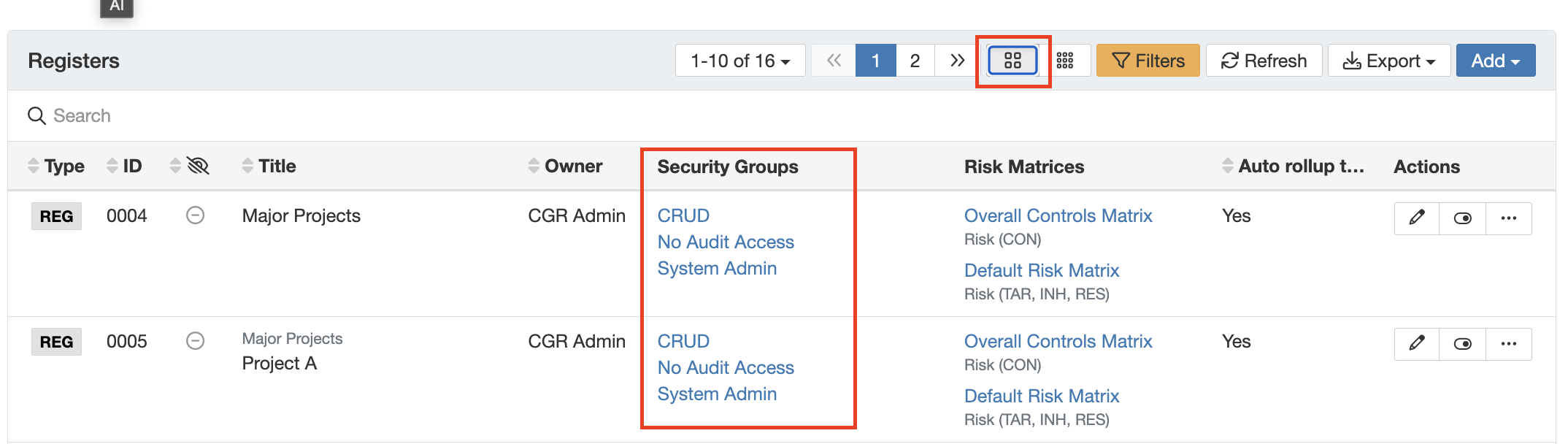
As a system admin you can view the different security groups applied to a register following the below steps:
- Navigate to Admin > Registers.
- Click the Detailed View icon to view the Security Groups applied to each register.
For more information, refer to the articles on Security Groups and Registers.
Was this article helpful?
That’s Great!
Thank you for your feedback
Sorry! We couldn't be helpful
Thank you for your feedback
Feedback sent
We appreciate your effort and will try to fix the article