Notices
How to view, search, and filter system notices in the Clew Platform
Contents
- 1. Introduction & Context
- 2. Key Features & Functions
- 3. Requirements
- 4. Step-by-Step Guide
- 5. Common Issues & Troubleshooting
- 6. Related Articles
1. Introduction & Context
Notices are system logs that record when background actions run in the Clew Platform, such as triggers, email notifications, reminders, and scheduled exports, so administrators can see what happened and investigate any failures.
Each notice shows whether the action succeeded or failed, when it occurred, the source that generated it, and any error messages if something went wrong.
Who is this for? System administrators who need to monitor automated actions and diagnose issues within the platform.
What does it impact? Notices are read-only. Viewing them does not change anything in the platform.
2. Key Features & Functions
- Success and failure tracking: Each notice is flagged as either a success or a failure, giving you an immediate view of whether a background action completed as expected.
- Error messages: Failed notices include a Messages field with further detail, helping you identify what went wrong and why.
- Source type visibility: Each notice shows the type of event that generated it, such as a trigger, email notification, reminder, or scheduled export.
- Search and filter: Search notices by keyword or filter by Type, Source Type, and Event to narrow the list to the entries you need.
3. Requirements
- System administrator access is required to view Notices via the Admin section.
4. Step-by-Step Guide
Viewing Notices
- Navigate to Admin > Notices. This will load a table listing all notices.
- Search for a specific notice using the search bar, or browse the list and select a notice from the main screen or the left-hand panel.
- Each notice in the list provides the following information:
Notice fields:
| Field | Description |
| ID | A unique identifier for each notice. |
| Type | Whether the notice is a Success or a Failure. See the Type reference table below. |
| Created at | Timestamp showing when the event occurred. The time zone reflects your user's time zone settings. |
| Source Type | The category of event that generated the notice. See the Source Types reference table below. |
| Source | The name of the specific item that generated the notice, such as a trigger or notification rule. |
| Event | The specific action or outcome that was recorded for this notice. |
| Messages | Additional detail or error information for the notice. Most useful when diagnosing failures. |
Type reference:
| Type | Description |
| Failure | The event ran but did not complete successfully. |
| Success | The event ran and completed successfully. |
Source Types reference:
| Source Type | Generated from |
| Directory User | SCIM users that get mapped to users within the Provisioners admin page. |
| Effect | Triggered effects that update fields before a record is saved within a trigger. |
| Email Notification | Notifications configured in the Email Notification module. |
| Email Notification Digest | Email notifications where individual users have opted to receive them as a digest. |
| Reminder | Reminders that users have manually set up on records where reminders are enabled. |
| Scheduled Dashboard Export | Dashboard exports that have been scheduled by users for themselves or others. |
| Trigger | Any triggers configured in the Triggers module. |
| Triggered Notification | Triggers that have been configured to send an email notification. |
Filtering Notices
Use the filters to narrow down the notice list and find the relevant records. You can filter by Type, Source Type, and Event.
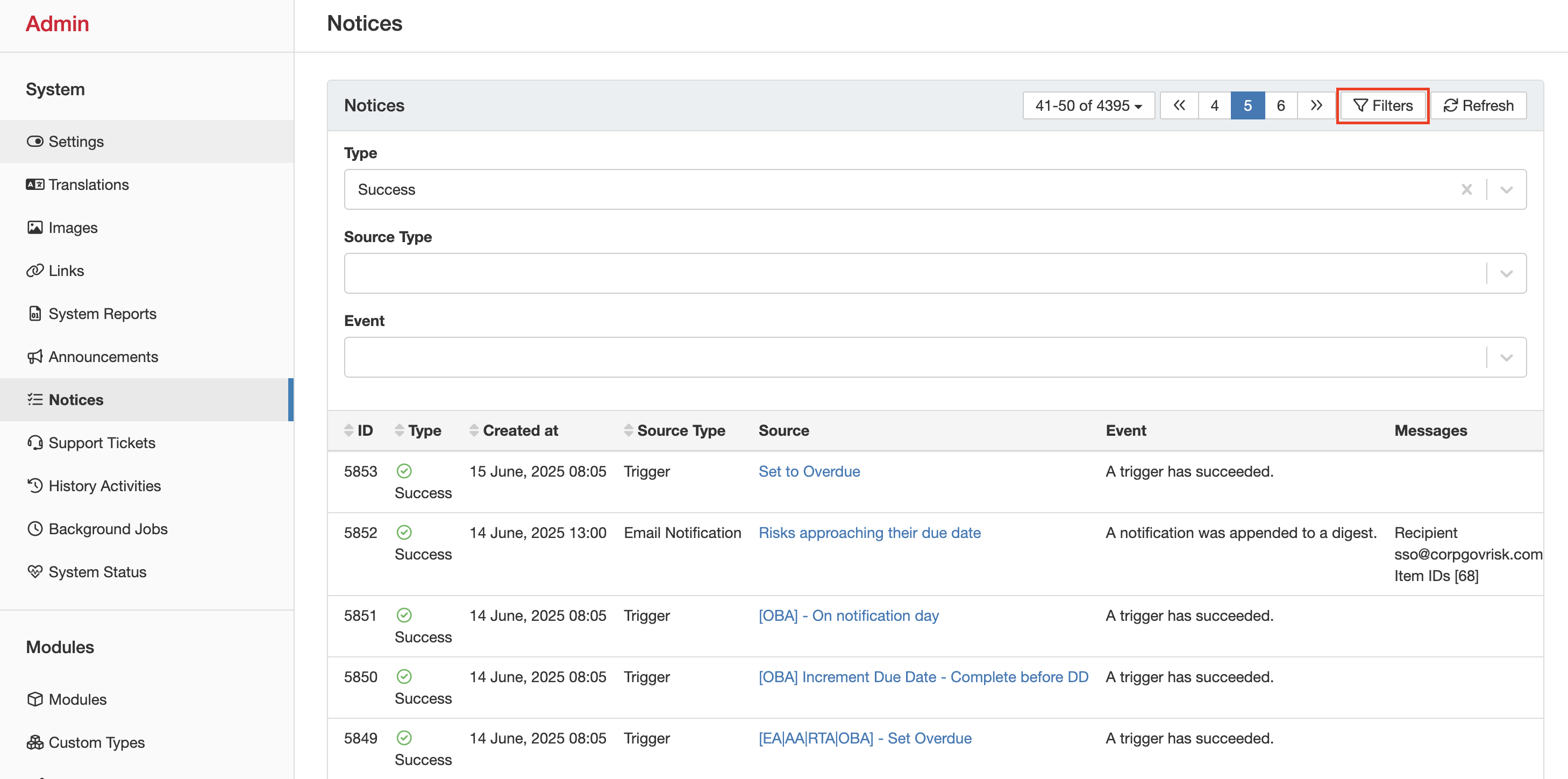
The Notices filter panel showing the Type, Source Type, and Event filter options.
5. Common Issues & Troubleshooting
| Issue | Likely Cause | Solution |
| Cannot access the Notices page | The user does not have system administrator access | Confirm the user has been granted system administrator permissions in the platform. |
| Expected notice is not appearing in the list | An active filter is hiding the notice, or the background action has not run yet | Clear all active filters and search by source name or ID. If the notice is still absent, the action may not have triggered yet. |
| A notice is showing as Failure | The background action ran but encountered an error | Open the notice and review the Messages field for the error detail. Use the Source and Source Type fields to identify and investigate the configuration that generated it. |
Best practices:
- When investigating a failure, always start with the Messages field. It usually contains the specific error that caused the action to fail.
- Use the Source Type filter to focus on a specific area, such as Triggers or Email Notifications, rather than scrolling through all notices.
- Check Notices after making changes to triggers or notification rules to confirm the updated configuration is running successfully.
Click a title to preview it here. Use the Open full article button to read the full version in a new tab.
▾Managing Images Open full article »
Related article
Explains how to upload and manage custom images, such as logos and visual references, across the Clew Platform.
Was this article helpful?
That’s Great!
Thank you for your feedback
Sorry! We couldn't be helpful
Thank you for your feedback
Feedback sent
We appreciate your effort and will try to fix the article