TABLE OF CONTENTS
Context
On the CGR platform, we distinguish between Core Fields, which are natively built into the system, and Custom Fields, which are created to meet specific customer requirements.
This article focuses on Core Fields, also referred to as default lookups, as some of the fields have been defined as a lookup type.
If a Core Field can't be found in the schema, it may be hidden within the Custom Type Settings. A system admin can verify this by following the steps below:
How to check if a Field is hidden in the Custom Type Setting
- Go to Admin > Custom Type
- In the Core field settings, look for the Hidden Fields on New Form. Ensure the desired schema field is not selected in the highlighted area.
In case it is selected, it means the field will be hidden from the ‘Add Form’ (Create Schema).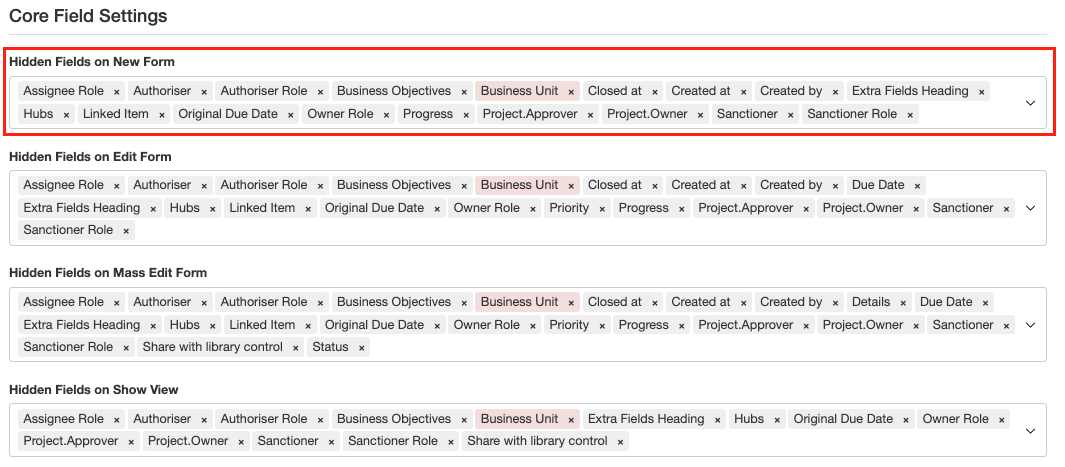
- Save the updated Custom Type.
- Now, go to the Admin section > Schemas.
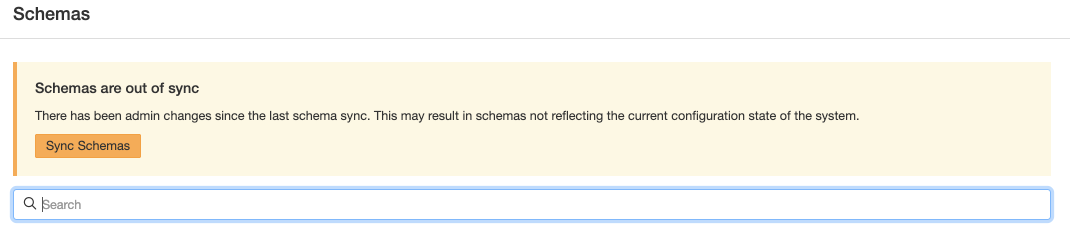
- Click ‘Sync Schemas’ to apply the changes in the form.
- Then search for the applicable schema and open it. In the builder panel find the field and ensure the hidden (eye icon) option is not selected and save.

Was this article helpful?
That’s Great!
Thank you for your feedback
Sorry! We couldn't be helpful
Thank you for your feedback
Feedback sent
We appreciate your effort and will try to fix the article