TABLE OF CONTENTS
Purpose
Indicator outcomes define the results of Indicator responses via the thresholds.
To set up indicator outcomes you need to have the module 'Indicators' enabled.
Step-by-Step Guide to Create an Indicator Outcome
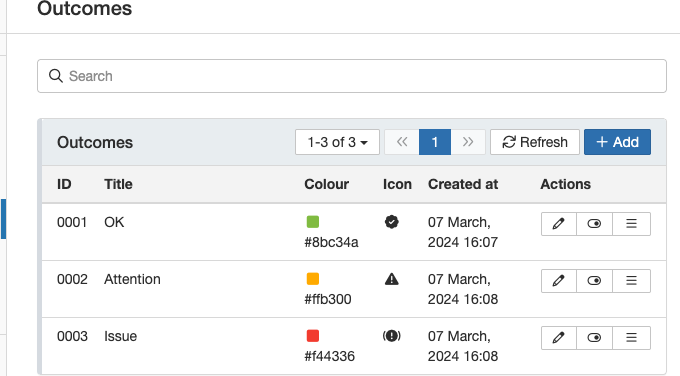
- To create an Outcome, navigate to Admin > Outcomes.

- You can define the levels of your outcomes as required. In this example, the values are 'OK', 'Attention' and 'Issue'. Select your preferred colour and icon for each outcome. This will help you to recognise the indicator that has been marked.
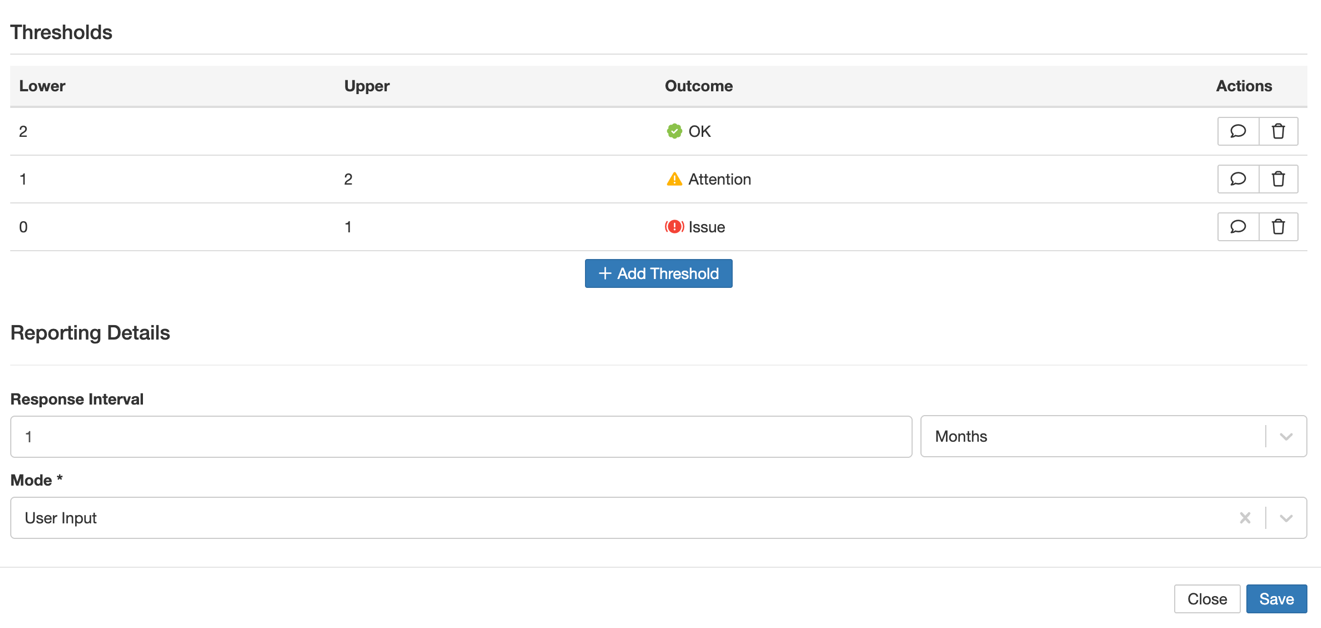
- Once outcomes have been created, they can be selected on the indicator thresholds. Each threshold can have an outcome assigned to it.
Was this article helpful?
That’s Great!
Thank you for your feedback
Sorry! We couldn't be helpful
Thank you for your feedback
Feedback sent
We appreciate your effort and will try to fix the article