Control Field Sharing
How field values are shared between library controls and local risk controls, and how to configure sharing for core and custom fields
Contents
- 1. Introduction & Context
- 2. Key Features & Functions
- 3. Requirements
- 4. Step-by-Step Guide
- 5. Common Issues & Troubleshooting
- 6. Related Articles
1. Introduction & Context
Control field sharing lets you decide which field values are pushed from a parent library control down to all its local risk controls, and which can vary independently at risk level.
Sharing a field enforces consistency across the organisation. Not sharing it allows each local risk control to hold a different value, which is useful for capturing how the same control performs differently across various risks or departments. Striking the right balance is an important configuration decision for each organisation.
Who is it for? System Administrators managing control configuration, and the Clew team for core field sharing settings.
What does it impact? How field values are displayed and edited on risk controls across the organisation. Changes to shared field settings can have a broad effect on existing control data.
2. Key Features & Functions
- Shared fields: the field value is pushed from the parent library control to all local risk controls. It displays with a library book icon next to its title on the form. Any change to the value applies across all local contexts of that control.
- Non-shared fields: the field value is specific to each local risk control. Editing it in one risk does not affect any other context of the same control.
- Core field sharing: configured in Admin settings and managed exclusively by the Clew team. Applies to built-in fields across the platform.
- Custom field sharing: managed by System Administrators. Sharing is determined by whether the custom field is added to the library control custom type or the risk control custom type.
- Permission-based editing: users without update permissions on library controls will see shared fields greyed out. Users with update permissions can edit shared fields but will receive a system prompt confirming the change will apply across all risk controls.
As a practical example, most organisations prefer to not share control effectiveness, allowing it to be rated differently for each risk or department. Fields that describe the nature of a control, such as Line of Defence, are more commonly shared to enforce consistent classification across the business.
3. Requirements
- Core field sharing: can only be adjusted by the Clew team. This access is retained by Clew because changes can considerably affect the behaviour of controls and library controls across the database.
- Custom field sharing: requires System Administrator access to configure.
- The majority of users should not have edit permissions on library controls. Giving too many users this access means changes intended for one risk can unintentionally affect the whole organisation.
4. Step-by-Step Guide
Core Fields
- Navigate to Admin > Settings > Control Settings. This page shows the options to share a number of core fields.
- When sharing is enabled for a field, the field value in the parent library control is pushed down to all local risk controls at risk level. It displays with a library book icon next to its title on the form. If the field value is changed, whether in the library control or in any local risk control, that change applies across all local contexts of the control.
- For users without update permissions on library controls, shared fields are not editable and will generally appear greyed out.
- For users with update permissions on library controls, shared fields appear editable but are marked with an icon to indicate sharing. Any edits apply across all other local risk controls. The system will prompt the user to confirm before applying the change, and will offer the option to create a new control (if the user has create rights), which creates a new library parent.
- When sharing is not enabled for a core field, the field is editable in each local risk control and its value is specific to that control. Editing it in one risk does not affect any other context of the same control in other risks.
- As long as a user has update permissions for risk controls, they can make changes to non-shared fields.
Custom Fields
- The same sharing behaviour described above applies to custom fields. However, sharing is managed at the level of the custom types for library controls and risk controls, rather than through the Admin settings page.
- To share a custom field with risk controls, add it to the library control custom type. It will then appear on risk controls with a library book icon next to the control title. Users without update permissions on library controls will see the field disabled and greyed out. Unlike shared core fields, there is no system warning when a shared custom field value is changed: the change applies silently across all risk controls. Use caution with custom fields on library controls; where possible, use core fields instead.
- To keep a custom field specific to individual risk controls, add it to the risk control custom type instead. The field will only appear on risk controls, not in the parent library control. Its value is editable locally and will not affect other contexts of the same control in other risks.
The screenshots below illustrate each scenario.
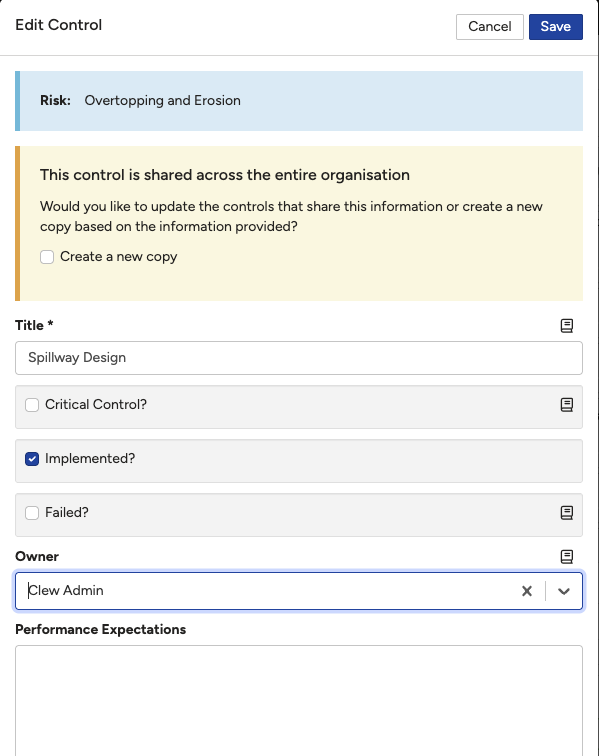 | 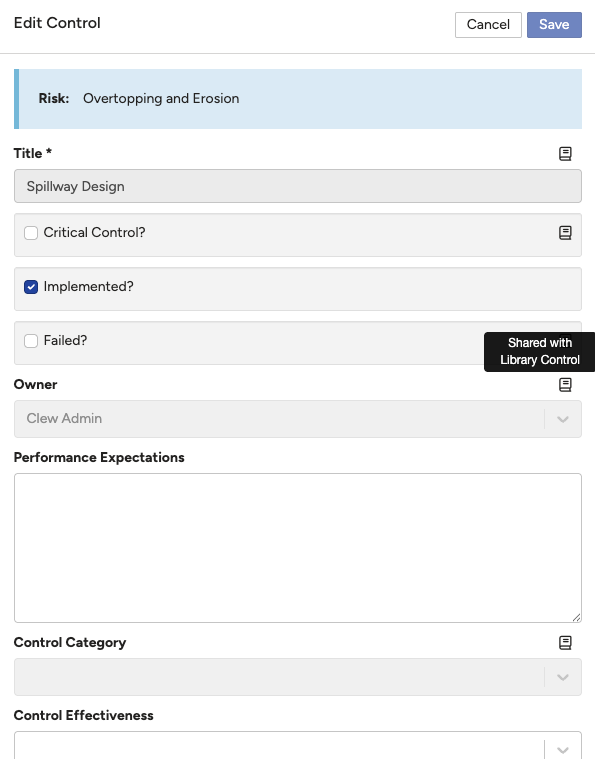 |
Figure 1: Left: a user with library control update permissions editing a shared Owner field, with a system warning that the change will apply across all other risk controls. Right: the same field greyed out and not editable for a user without those permissions.
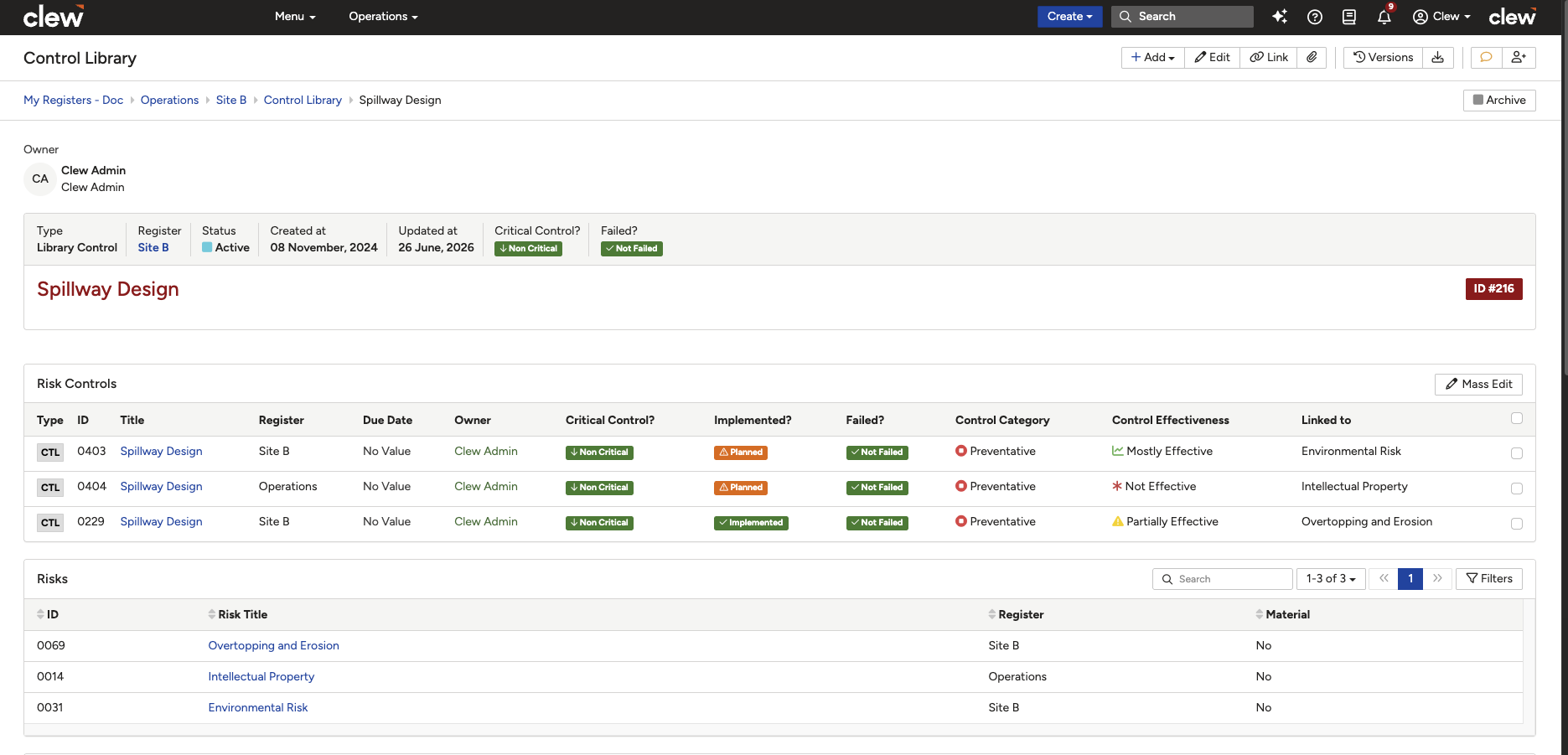
Figure 2: An example benefit of not sharing: control effectiveness rated differently at risk control level across different risks and departments/registers, providing insights into control performance across the business.
5. Common Issues & Troubleshooting
| Issue | Likely Cause | Solution |
| A shared field is greyed out and cannot be edited | The user does not have update permissions for library controls | This is expected behaviour. Only users with library control update permissions can edit shared fields. Contact your System Administrator if access needs to change |
| A change to a shared field has applied unexpectedly across multiple risk controls | A user with library control update permissions edited a shared field without creating a new control | Review the system warning prompt carefully before confirming changes to shared fields. If the change should only apply to one risk context, use the option to create a new control instead |
| A custom field is not appearing on risk controls | The custom field has not been added to either custom type | Add the field to the appropriate custom type. To share it with risk controls, add it to the library control type. To keep it local to each risk control, add it to the risk control type |
| Core field sharing options are not visible in Admin settings | Core field sharing is managed by the Clew team only | Contact the Clew team to request a change to core field sharing settings |
Best practices:
- Restrict library control update permissions to a small group of trusted administrators to avoid unintended organisation-wide changes.
- Use core fields in preference to custom fields on library controls where possible, as core field changes trigger a system warning that custom field changes do not.
- Agree field sharing configuration before going live, as changes after launch can cause widespread data disruption.
- Fields that describe what a control is (such as Line of Defence or Control Type) are generally good candidates for sharing. Fields that measure performance (such as Control Effectiveness) are generally better left unshared.
Click a title to preview it here. Use the Open full article button to read the full version in a new tab.
▾Risk Insights: What Data is Available Open full article »
Related article
Outlines the data available through Risk Insights, including how field values such as control effectiveness can be analysed across risks and registers.
Was this article helpful?
That’s Great!
Thank you for your feedback
Sorry! We couldn't be helpful
Thank you for your feedback
Feedback sent
We appreciate your effort and will try to fix the article