Adding an Application (OAuth)
How to register and configure an application in Clew so external systems can connect via APIs
Contents
- 1. Introduction & Context
- 2. Key Features & Functions
- 3. Requirements
- 4. Step-by-Step Guide
- 5. Common Issues & Troubleshooting
- 6. Related Articles
1. Introduction & Context
Adding an application in Clew registers an external system as an authorised client, so it can connect to Clew and exchange data securely through Application Programming Interfaces (APIs). This article explains what an application is, when you would add one, and how to complete each field on the Add Application form.
Applications connect users with software systems and help them perform tasks. Beyond direct user interaction, many applications also connect to other software systems using APIs, which allows smooth communication, data sharing, and integration with other products or services.
Who is it for? Administrators who need to connect an external product, service, or integration to Clew, or who manage API access on behalf of their organisation.
What does it impact? A registered application controls how an external system authenticates with Clew and what data it can access. The grant flow, scopes, and trust settings you choose directly affect the security of that connection, so they should be set deliberately.
2. Key Features & Functions
- Multiple grant flows: support for Authorisation Code, Client Credentials, and Device Code flows, so you can match the connection method to how the external system works.
- Secure API access: external systems authenticate with their own credentials and receive tokens to call Clew APIs.
- Scoped permissions: scopes define exactly which parts of a user's data an application can access, so it only receives the access it needs.
- Trust and confidentiality controls: mark an application as trusted or confidential to control the consent screen and how securely it must store secrets.
- Clear ownership: each application is linked to an owner, giving clear responsibility for its management.
3. Requirements
- Administrator access is required to add and configure an application.
- The Redirect URI for the external system, if you are using the Authorisation Code flow.
- Knowledge of which grant flow and scopes the external system needs.
4. Step-by-Step Guide
Adding an Application
- Go to Admin, then Application, and click the blue add button in the top-right corner.
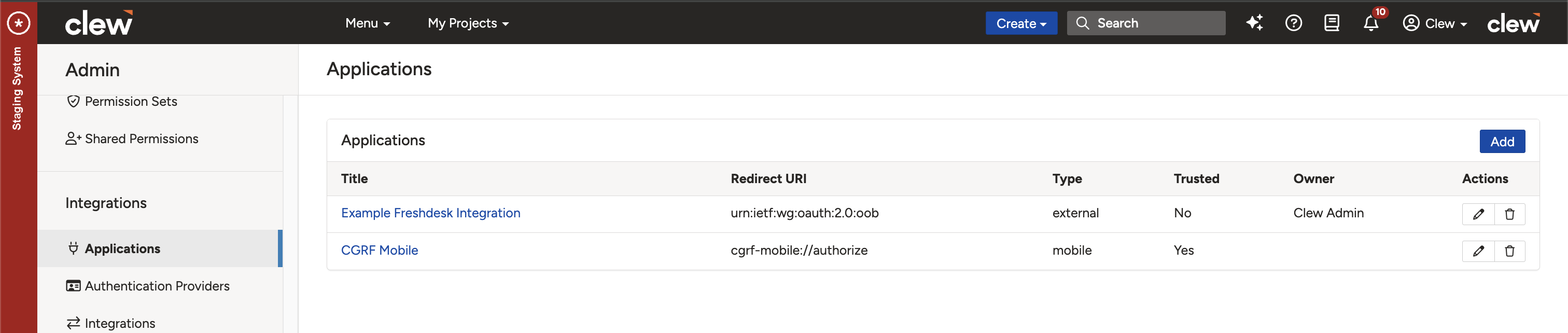
Adding a new application from the Admin Application page.
- Specify values on the Add Application form, using the field reference below for guidance.
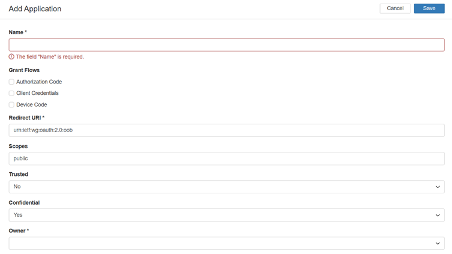
The Add Application form.
Application Field Reference
Enter appropriate values for the following fields.
| Field | Description |
| Grant Flows | Determines how the application obtains an access token. Choose the flow that matches the external system:
|
| Redirect URI | The link where the user is sent after logging in and approving access. It must match exactly what is registered for the app, so the response goes to the right place. This keeps the login process secure and ensures only the correct app gets access. |
| Scopes | Defines which parts of a user's data the app can access, such as their email, profile, or basic info. One common scope is public, which usually gives access to general, non-sensitive information. When the user logs in, they see the scopes the app is requesting and can allow or deny them. This protects the user by giving the app only the access it actually needs. |
| Trusted | Indicates whether the application is considered safe and reliable by the system. A trusted app may skip the user consent screen during login, making it faster. This is usually only appropriate for apps owned or managed by the same organisation. Marking an untrusted app as trusted can be risky, so only do this for apps that are fully verified and secure. |
| Confidential | Indicates whether the client can keep secrets securely. Set to Yes for a confidential client, such as a web server with a secure backend that can safely store secret information. Set to No for public clients such as single-page applications (SPAs) or mobile apps that cannot securely store secrets. This helps apply stronger security measures to clients that can keep information confidential. |
| Owner | Specifies the user or account that owns the client registration. It links the application to a particular user or administrator, ensuring clear responsibility and management. This information is required. |
5. Common Issues & Troubleshooting
| Issue | Likely Cause | Solution |
| Redirect URI mismatch: an error saying "redirect URI does not match". | The URI in the app does not exactly match the one registered. | Make sure the redirect URI is identical, including the https prefix and any trailing slashes. |
| Invalid client credentials: an "invalid client ID or secret" error. | A wrong or outdated client ID or secret. | Check the values in your integration settings and update them to match the registered application. |
Best practices:
- Give each application its own client ID and secret rather than reusing credentials, for better security and tracking.
- Only mark an application as trusted when it is fully verified and managed by your own organisation.
- Request only the scopes the application genuinely needs.
- Double-check the redirect URI, including https and trailing slashes, before saving.
Click a title to preview it here. Use the Open full article button to read the full version in a new tab.
▾Do I need a redirect URI for all apps? Open full article »
Related article
When a redirect URI is required, and which grant flows can be set up without one.
▾What is a scope, and why is it needed? Open full article »
Related article
What scopes are and how they limit an application to only the data it needs.
▾Can I reuse the same client credentials for multiple apps? Open full article »
Related article
Why each application should have its own client ID and secret rather than sharing credentials.
▾What happens if I mark an app as trusted? Open full article »
Related article
What marking an application as trusted changes, including skipping the consent screen, and when it is safe.
Was this article helpful?
That’s Great!
Thank you for your feedback
Sorry! We couldn't be helpful
Thank you for your feedback
Feedback sent
We appreciate your effort and will try to fix the article