How to View the Access Matrix on a Security Group
How a System Administrator sees the Access Control Matrix for a security group.
Contents
- 1. Introduction & Context
- 2. Key Features & Functions
- 3. Requirements
- 4. Step-by-Step Guide
- 5. Common Issues & Troubleshooting
- 6. Related Articles
1. Introduction & Context
A System Administrator can view the Access Control Matrix of a security group, which shows the access that group grants across your registers and modules. This is the group-level view of the same matrix you can open for an individual user.
Who is it for? System Administrators who want to see what access a security group provides.
What does it impact? Viewing the matrix is read-only. A user's actual access comes from the combination of the security groups they belong to.
2. Key Features & Functions
- Group-level matrix: see the access a security group grants, in one view.
- Registers and modules: registers run along the x-axis and the access levels for each module along the y-axis.
3. Requirements
- You must be a System Administrator to view a security group's access matrix.
4. Step-by-Step Guide
- Go to Admin > Security Groups.
- Search for the relevant security group and click the checkbox icon to view its access matrix.
- In the Access Control Matrix, the registers run along the x-axis and the access levels for each module run along the y-axis.
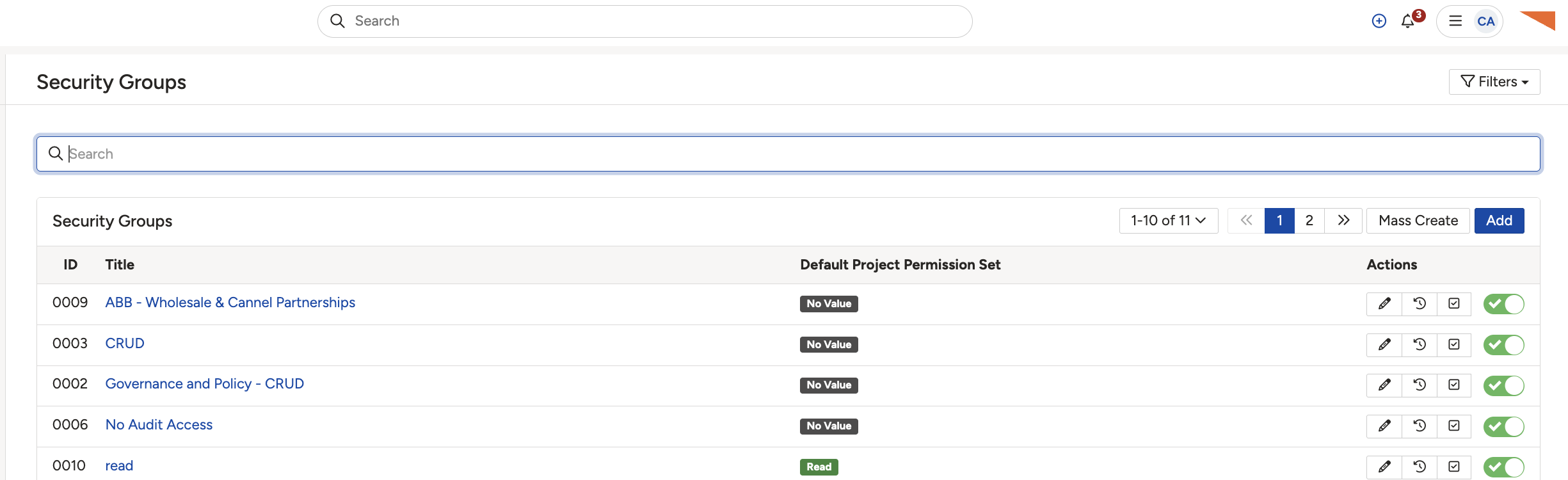
Click the checkbox icon on a security group to view its access matrix.
5. Common Issues & Troubleshooting
| Symptom | Cause and what to do |
| You cannot open Admin > Security Groups. | Viewing security groups requires System Administrator access. Ask a System Administrator to check for you. |
| A user's access does not match this group's matrix. | This matrix shows only what this group grants. A user's full access is the combination of all the groups they belong to, so check their other groups too. |
▾Security Groups Open full article »
Related article
How security groups work and how a user's access is built from them.
▾Access Control Matrix Open full article »
Related article
More on the Access Control Matrix and how to read its registers, modules, and permission letters.
Was this article helpful?
That’s Great!
Thank you for your feedback
Sorry! We couldn't be helpful
Thank you for your feedback
Feedback sent
We appreciate your effort and will try to fix the article