AI Meter
How to check your AI usage and monthly bill in the AI Meter
Contents
- 1. Introduction & Context
- 2. Key Features & Functions
- 3. Requirements
- 4. Step-by-Step Guide
- 5. Common Issues & Troubleshooting
- 6. Related Articles
1. Introduction & Context
The AI Meter gives you an overview of your AI usage in Clew, so you can track daily usage and your monthly bill in one place. It is available exclusively to customers who have opted in to Clew's AI-enabled features.
Who is it for? System Administrators of organisations that have opted in to Clew's AI-enabled features.
What does it impact? The AI Meter is a reporting view only. It shows your usage and billing data and does not change any settings or AI features.

The AI Meter overview page.
2. Key Features & Functions
- Usage overview: see an at-a-glance summary of your AI usage.
- Daily usage graph: view daily usage and the monthly bill for the selected month.
- Month selection: switch between months to review usage from earlier periods.
3. Requirements
- Your organisation must have opted in to Clew's AI-enabled features.
- System Administrator access is required to view the AI Meter in the Admin section.
4. Step-by-Step Guide
Check your AI Meter
- Navigate to Admin > AI Meter and click it to open the meter page.
- When the page loads, it displays data for the current month. To see a different month, select it in the month field.
- After selecting the month, the graph shows the daily usage and the monthly bill for that period.
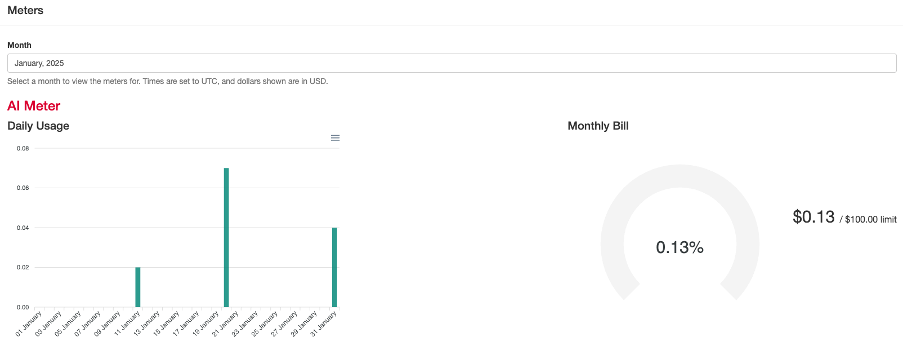
The AI Meter graph showing daily usage and the monthly bill.
5. Common Issues & Troubleshooting
| Issue | Likely Cause | Solution |
| The AI Meter is not visible in the Admin menu | Your organisation has not opted in to AI-enabled features, or you do not have System Administrator access. | Confirm your organisation has opted in to Clew's AI-enabled features and that your account has System Administrator access. |
| No data or graph appears for a month | There was no AI usage in the selected month, or the month has not been selected. | Select the correct month in the month field. If a month has no usage, the graph will have no data to display. |
Best practices:
- Check the AI Meter regularly to monitor usage against your monthly bill.
- Use the month field to compare usage across different periods.
Click a title to preview it here. Use the Open full article button to read the full version in a new tab.
▾API v2 Authentication Open full article »
Related article
How to obtain and use an OAuth 2.0 access token to authenticate requests to the Clew API v2.
Was this article helpful?
That’s Great!
Thank you for your feedback
Sorry! We couldn't be helpful
Thank you for your feedback
Feedback sent
We appreciate your effort and will try to fix the article