TABLE OF CONTENTS
Context
All CGR modules have "mass" functionality. This allows users to:
- Mass Delete
- Mass Edit
- Mass Link
- Mass Clone
- Mass Attach
Important Note:
Mass functionality in CGR depends heavily on user access and permissions. For instance, users who can’t edit records also can’t perform mass attach actions. In some cases, users can edit individual record, but mass actions are still blocked unless the user is explicitly granted permission through a security group.
System administrators manage your Read, Update, Delete, and Mass permissions. If you need different access, contact your system administrator.
How to mass attach any attachment?
If you have the ability to mass attach records in CGR, please follow the steps below:
- Navigate to your desired Register from the Registers dropdown menu.
- Select the required list view via the Menu dropdown, in this example: Risk
- Select the checkboxes of the records you wish to mass attach on the right-hand side.
- At the top, click paperclip icon to mass attach.
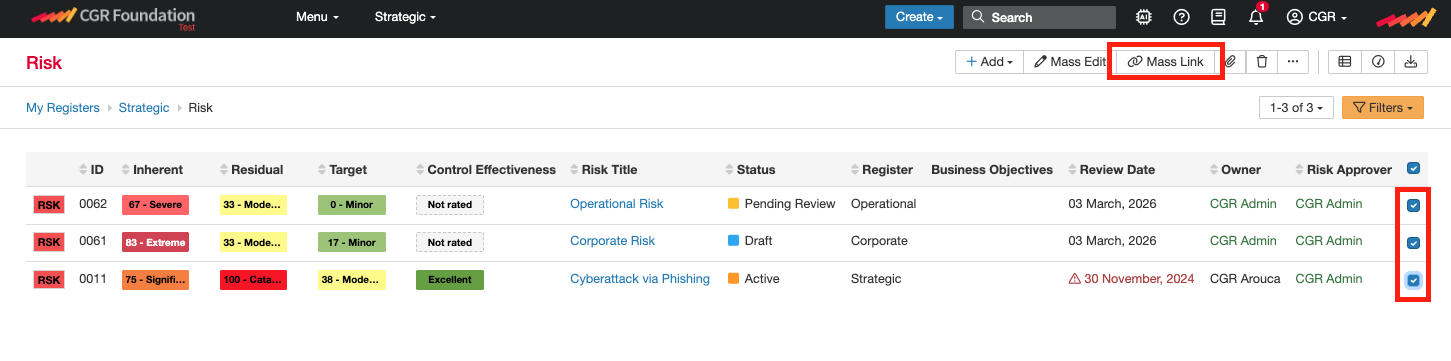
- Attach the relevant file/s and mark its sensitivity level for users to access and save.
Note: Sensitivity field might not be applicable to everyone.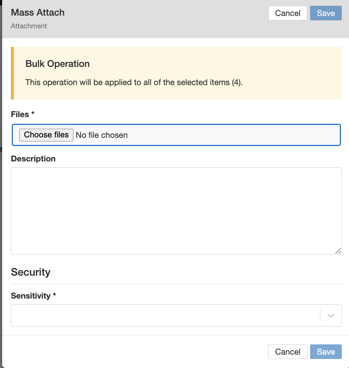
Was this article helpful?
That’s Great!
Thank you for your feedback
Sorry! We couldn't be helpful
Thank you for your feedback
Feedback sent
We appreciate your effort and will try to fix the article